Your score, on your site
Show your
Good for Bots score.
Add a free, live badge to your website. It updates after each published scan and links to your public report.
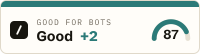
Three steps. One small embed.
An image and a link. No script to install.
- 01
Find your report
Enter your domain above to find your published report and its badge.
- 02
Copy the code
Click the badge on your report to copy HTML, or open “Embed on your site”. Choose HTML for your website or Markdown for a README.
- 03
Add it to your site
Paste it into your footer, ideally on your homepage. Keep the link to your report so visitors can see the evidence.
HTML / example only
Get your own HTML or Markdown from your report.
<a href="https://goodforbots.com/r/example.com"><img src="https://goodforbots.com/badge/example.com.svg" alt="Good for Bots score for example.com" width="200" height="54"></a>A thank-you for sharing
Display your badge. Earn a dofollow backlink.
On Free, your backlink becomes dofollow after a scan detects the link back to Good for Bots on your site. Add the linked badge to your homepage footer, where our bot can find it.
Verification happens during a scan, not the moment you paste the code. Pro listings already have a dofollow backlink, with or without a badge. Installing a badge never changes your score. Compare Free and Pro
Small badge. Clear meaning.
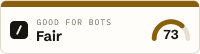
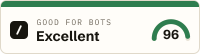
Illustrative scores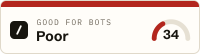
One score, out of 100
The number is your latest published score. The word and colour show its band: Poor, Fair, Good, Excellent.
Extra capabilities, shown separately
A +N beside the band counts detected agent capabilities, such as MCP or A2A. These do not add points to the score.
A report behind every badge
Clicking your badge opens the checks and findings behind the number. Payment never changes the score.
Is the badge free?
Yes. The live badge and HTML and Markdown embed snippets are available on Free and Pro. Installing it is optional, and both plans receive the same score.
When does the badge update?
It reflects your latest published scan automatically; you do not need to replace the embed code. It does not continuously monitor your site. Image caches can delay when a new result appears.
What if my score drops?
The badge shows the new score and band after the next published scan. A lower score is not hidden. If the bot is blocked or your site opts out, the badge shows “Blocked” or “Opted out” instead of a scored band.
Can I use it in a GitHub README?
Yes. Copy the Markdown snippet from your report. GitHub caches images, so updates may take longer to appear. A badge in a GitHub README alone does not earn a dofollow backlink for your website: verification looks for the link on your own site.
Why is my backlink still nofollow?
On Free, a scan must find the link back to Good for Bots on a page it reads. Put the linked badge in the server-rendered homepage footer and allow our bot to read the page. A badge image without the link does not count; installing it on a page the scanner never visits may not be detected. Once it is in place, request a rescan or wait for the next automatic scan.
Does it need JavaScript or a plugin?
No. The HTML embed is an SVG image inside a link. Paste it into a custom HTML block or your site’s template. Keep the hosted image URL so the badge can update after future scans.